The Team Stack: How to Connect Your AI to Your Team
Imagine you’ve just spent an afternoon building a skill that drafts your client follow-up emails. A skill is a set of saved instructions your AI can use again and again. This one works, and you start using it every week. Then a colleague asks if they can use it too, and that’s when you notice where everything lives. The skill, your notes and everything your AI knows about the work sit in your files. Your colleague’s AI can’t see any of it.
I taught how to fix that in Week 7 of the Humane Business AI Accelerator, our AI program for business owners and their teams. Here’s the short version. I call it the Team Stack.
Start with your own Human Stack
The Human Stack is a set of five folders that hold files about you, how you work and what you’re working on right now. Some of those files are plain text files ending in .md, with capital-letter names like AGENTS.md, ME.md and INDEX.md. They tell your AI how you like to work and what you care about.
Three things work together here. There’s you, your AI and your files. You work with your AI, and your AI reads your files before it starts.
Your AI is the one you chat with. More recently, it can also hand work to agents. An agent is AI that does one task on its own, once your AI hands it the work. So you end up with a small group of AI working around you, and you’re still the one making the calls.
That works well for one person. The moment you work with other people, you need a way to share some of it.
Each person keeps their own, and the team shares one
Your Human Stack stays private. Nothing in it moves, and nobody else reads it.
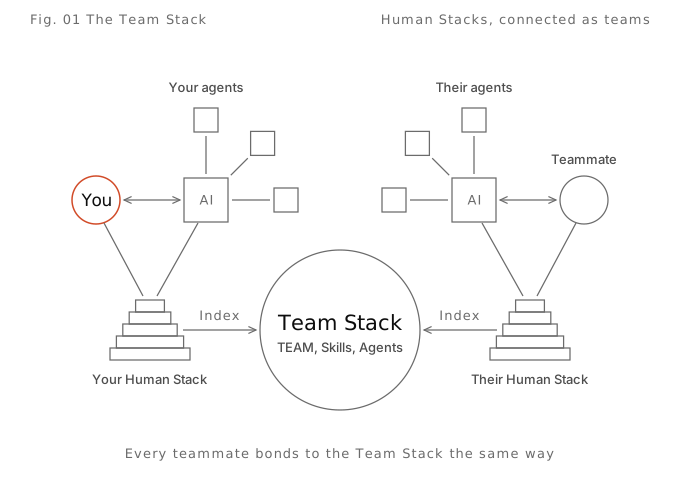
The team gets one shared folder, and we call it the Team Stack. It holds whatever the team needs to do its work together. That starts with a TEAM document that says who’s on the team and who does what. Then come the skills you all use and the agents that run for the team. Then the things everyone reaches for, like standard operating procedures (SOPs), brand guides, past campaigns and emails that worked.
The Team Stack belongs to the team. It isn’t one person’s folder with everyone else looking in. Every teammate connects to it in the same way, from their own Human Stack.
To work with a team, you add one shared folder on top of what you’ve already built. I think of it like Lego, where each new block sits on the blocks you already have.
One line connects you to the team
The connection is one line of text. We call it the wiring, though there are no cables involved.
Your AGENTS.md tells your AI to read your INDEX.md first. INDEX.md is a list of where all your files and folders live. It works like the index in a library, and it can point to folders outside your Human Stack too.
To connect to the team, you open your INDEX.md and add one line. You can type it yourself or ask your AI to add it. Something like this:
Team work: first read the Team Stack for [team name], in [where it lives].
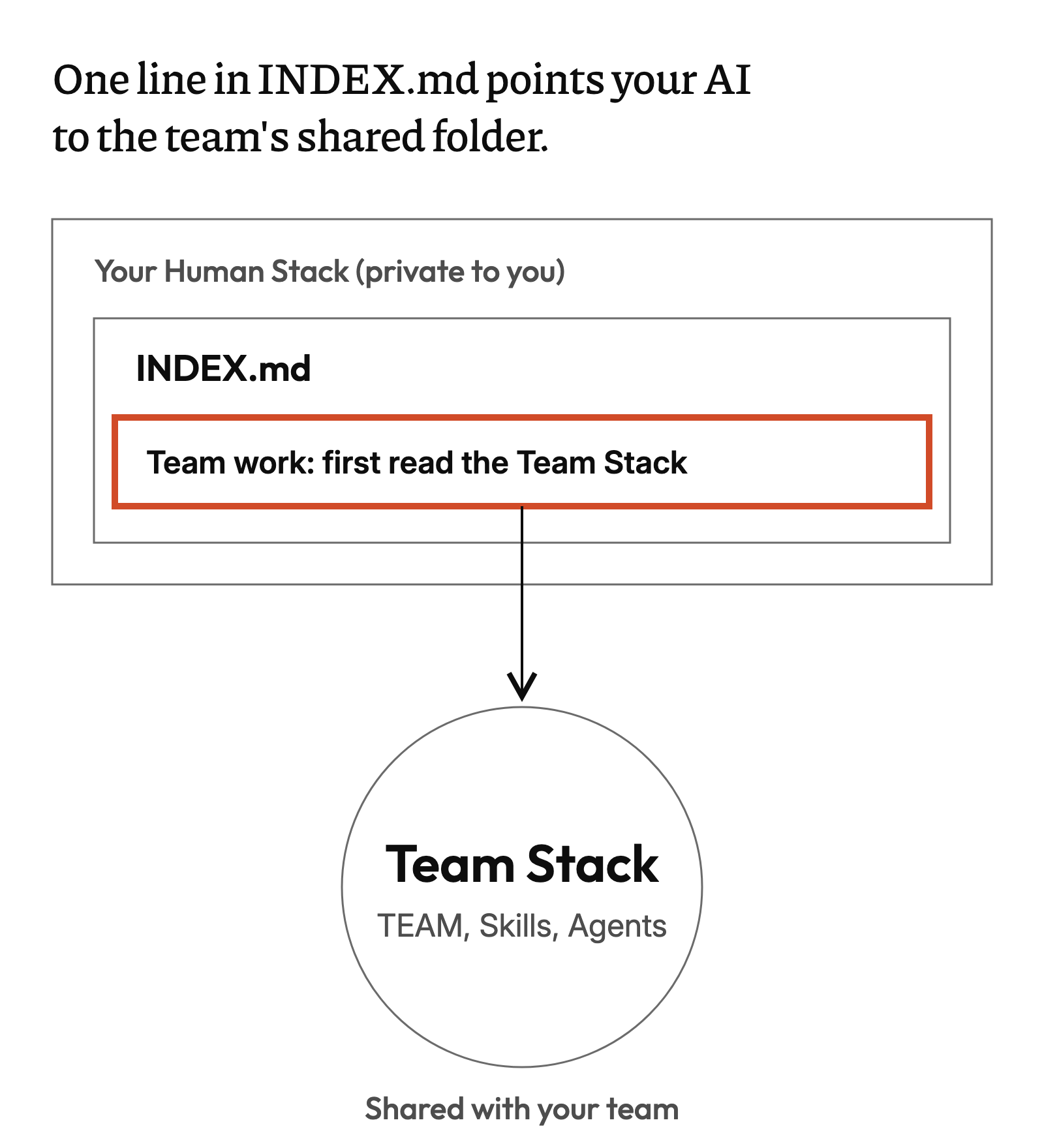
That one line is the wiring. Your AI reads it and follows it. My co-founder at Humane Business, Rosario Londoño, and I share a Team Stack, and it lives in Google Drive. When I tell my AI I’m working on a Humane Business project, it finds that folder and reads it before it starts.
Your Team Stack can live wherever your team already keeps its files. That could be Google Drive, SharePoint, OneDrive, Dropbox or Box.
Every teammate adds the same line to their own INDEX.md. If you’re on more than one team, you add one line for each.
You don’t need to understand every part of the wiring, as long as you get the idea. I have my own Human Stack, I work with my AI, and it can bring in agents to help with the work. When I work with others, we share one Team Stack, so we can share skills, agents and everything we need to do the work.
Set it up in five steps
- Make one shared folder. Put it where your team already keeps files, and name it Team Stack.
- Write the TEAM document. Say what the team is for and who’s on it. List the people, the AI tools each person uses, the skills and any agents. Say who owns what, and which jobs AI never does on this team. Add a folder for Skills and one for Agents.
- Share it with the team. Give each teammate permission to view it. Only the person who owns a skill edits that skill, so one person’s fix doesn’t break someone else’s work.
- Add your line to INDEX.md. Name the team, the folder and where it lives, so the line makes sense on its own.
- Test it. Connect your AI to the place the folder lives, such as Google Drive. Then ask, “What does our TEAM document say?” If it reads it back to you, the connection works. If it can’t, check your AI is connected to that place. Then check your line in INDEX.md names the right folder.
Two things we learned while setting this up. First, check which files your AI can read in your shared folder. When we set ours up, Claude’s Google Drive connection read Google Docs but not .md files. So on Drive, we write the TEAM document as a Google Doc.
Second, nothing private goes in the Team Stack. That means no client details, no bank details and no passwords. Those stay in your own Human Stack, or nowhere at all.
You don’t have to do any of this by hand. In Week 7, I gave everyone a prompt that walks them through the setup one question at a time. It asks before it changes anything. Your AI guides you, and you stay the one deciding.
What you get from it
Go back to that follow-up email skill. Once it sits in the Team Stack, your colleague’s AI can find it and use it, and so can everyone else on the team. When somebody finds a better prompt or fixes a mistake in a skill, it goes in one place and the whole team gets it.
Each person keeps their own Human Stack, and one line in INDEX.md connects them all to the team’s shared Team Stack. In our AI Accelerator, members map how their business runs and build their first skills before they set up a Team Stack. Then they set one up for each part of the business. If you want to start with your own AI first, our AI Sprint is three hours live on Zoom. You start your Human Stack with a page about you that your AI reads every session, and you build your first agent on your real work.