Obsidian Is the Lens. GitHub Keeps the Agents in Sync.
Does Obsidian use AI? No. Obsidian is a notes app that opens a folder of files on your own computer. It’s the app I look at my files with, and that’s what I mean when I call it the lens.
The AI lives somewhere else, in agents. Agents are AI tools that do tasks for you, like drafting an email or sorting your notes.
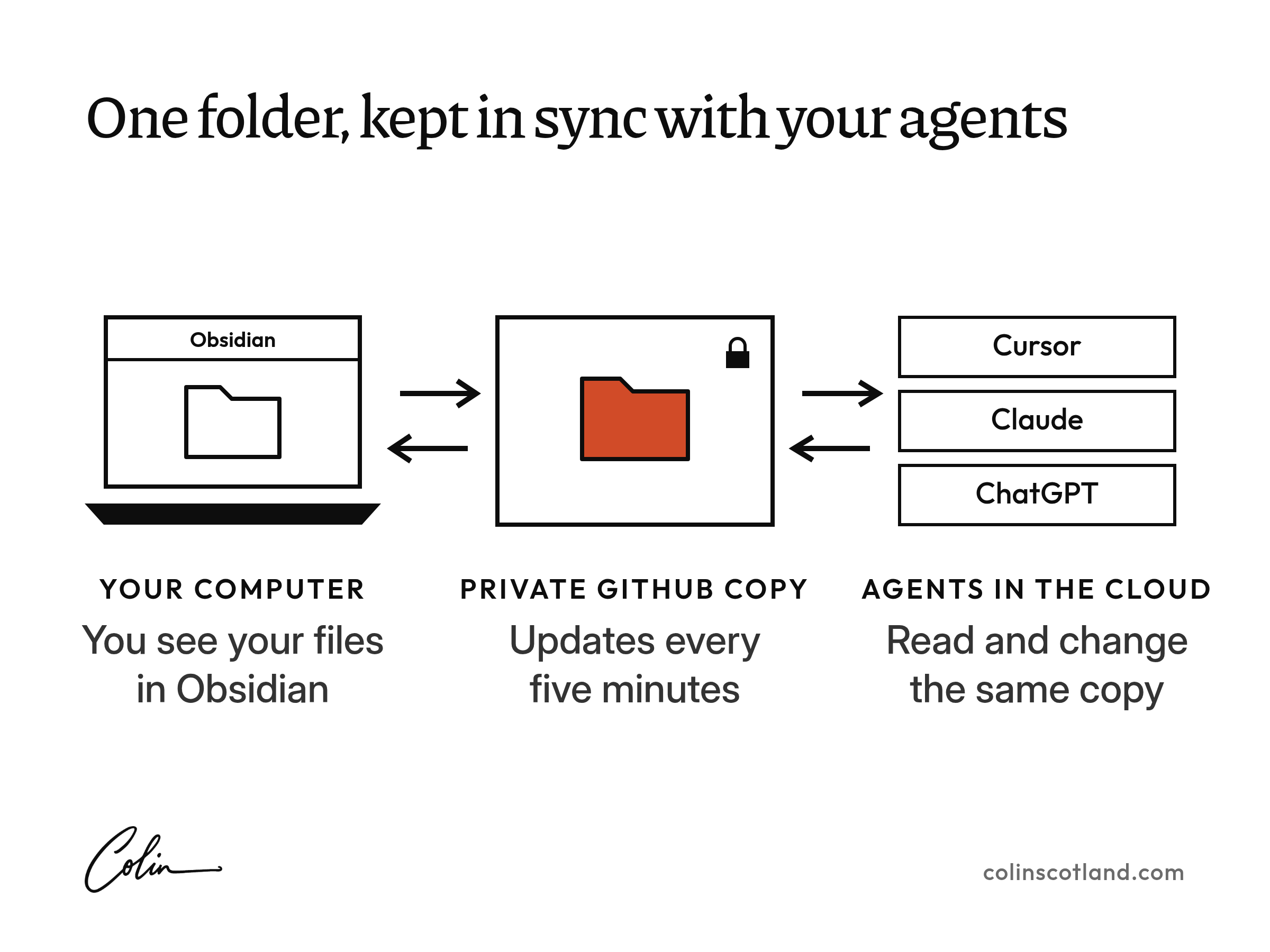
To connect the two, I keep a second copy of the same folder on GitHub. GitHub is a website that stores copies of files, and my copy there is private. The two copies stay in sync, which means a change in one shows up in the other within a few minutes. My agents work on the GitHub copy, so they always see the latest version of my files.
I call that folder my Human Stack. It has five folders, covering who I am, how I work, my projects, what’s happening this week and my ideas. I use Obsidian to see it, and GitHub keeps all my agents working from the same files.
The Human Stack lives on your machine
My Human Stack lives in a folder on my own computer. It’s plain text files written in Markdown, a simple format almost any app can open, and I own all of it.
Obsidian is basically the window I use when I want to read, write and move those files around by hand. In my setup, the cloud storage, the AI model and the agents all sit outside Obsidian.
That matters because a lot of people search “does Obsidian use AI” and expect the answer to be a built-in model. Obsidian can run plugins, which are small add-ons, and some of them open an AI chat beside your notes. Obsidian calls the folder it opens a vault, and in my setup the AI stays outside the vault. The vault stays as plain files that the agents read and write, and I still decide which of their changes I keep.
Why the agents need a mirror
I’ve got agents working in three AI tools, Cursor, Claude and ChatGPT. Agents all over the place, and I like it that way.
Those agents work in the cloud, which means on the AI companies’ computers, so they can’t reach a folder that only lives on my laptop. That’s why the same folder is also copied to a private storage space on GitHub, called a repository. A free Obsidian plugin called Obsidian Git syncs the two every five minutes. When an agent changes a file on GitHub, the change comes back down to my computer at the next sync.
So there’s one set of files, kept in sync, and it feels seamless. Cursor, Claude, ChatGPT and me in Obsidian are all working from the same up-to-date Human Stack.
Capture ideas while you’re talking
I also keep a widget on my phone’s home screen called Capture. It’s a shortcut button, and when I tap it, it opens a new note straight into the ideas folder in Obsidian.
That’s how I hold on to ideas from a live call. When I’m teaching or drawing something on screen and I say something worth keeping, I don’t wait for a free hour. I tap Capture and write it down while the conversation is still going. The note goes into my ideas folder, which sits inside my Thinking folder, where I keep ideas I haven’t used yet. Later the agents can look through those notes, and I still choose which ones become a post and which ones stay private.
What this setup is for
The point of all this is that you stop teaching every new AI about yourself from scratch.
When every agent reads the same files, the work carries on from one day to the next. The agent that wrote yesterday’s draft can pick up today’s edit. The one that filed the meeting notes can pass them on to the one that drafts the newsletter. You don’t have to paste the same background into every new chat. You tell the agent which folder to read, and it learns who you are and how you work from your files.
You still choose what each agent reads, so you don’t hand it the whole folder every time you ask for something. For writing, I give an agent my Identity folder, which describes who I am, and my notes on how I write. For planning the week, it reads my Pulse folder, which holds what’s going on right now. When it’s helping me make something, like a new web page, it reads the short brief I wrote for that project. The sync just makes sure those files are up to date wherever the agent runs.
If you switch to a different AI next month, you give it the same folder. Everything it needs comes with your files, and none of it is stuck inside one company’s app.
Five steps to set this up
You don’t need a team of agents to start. Here’s what to do this week.
- Put the files that matter into one folder on your own computer.
- Open that folder in Obsidian so you can see it clearly.
- Copy the folder to a private GitHub repository. Turn on a sync plugin like Obsidian Git so the copies update every few minutes.
- Let one AI agent read the folder first. Let it make changes only when you’re ready to check what it changes.
- Capture ideas from a conversation straight into the same folder, so they don’t get lost in a chat window.
If you want to copy my five folders, the Human Stack page explains each one. If you’re still setting up Obsidian, why Obsidian and Obsidian setup cover the app itself.
FAQ
Does Obsidian use AI? No. Obsidian is an app for reading and writing a folder of plain files on your computer. The AI sits elsewhere, in agents. What makes them feel connected is keeping that folder in sync with the place your agents work.
Why mirror Obsidian to GitHub for AI agents? Agents that run in the cloud can’t reliably reach a folder that only lives on your laptop. GitHub is a website that stores copies of files, and a private GitHub repository gives you and your agents one shared copy. A plugin syncs your folder with it, the agents make their changes there, and those changes come back to your computer.
Do I need a team of agents for this to work? No. One agent that can read and write the same folder is enough. What matters is that every tool works from the same Human Stack, kept in sync.
Is this the same as putting my notes in ChatGPT’s memory? No. Chat memory lives inside one company’s product. A folder you own, copied to a private repository you control, goes wherever you go. You can give a different AI the same folder without starting over.
Where you fit in
Obsidian shows you the files, and GitHub makes sure every agent is working from the latest version. You stay in the middle, deciding what the agents get to change.
Start with step one this week. For one practical insight each week on working with AI without losing yourself, there’s the Intelligence Briefing. For help building your own stack, there’s Amplify OS.